How to Install Urdu Phonetic Keyboard (v1.0)
To download and install click Urdu Phonetic Keyboard
Windows Vista / 7
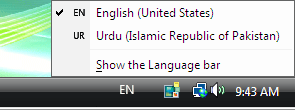
If you are using Windows Vista, after installing the above keyboard you can type Urdu on your Windows Vista Computer. To switch between Urdu and English keyboard, you can press Alt+Shift. Or on your task-bar you can see EN or UR and click on it to select the language as shown in this figure:


No comments:
Post a Comment